
See What Your Menu Reveals.
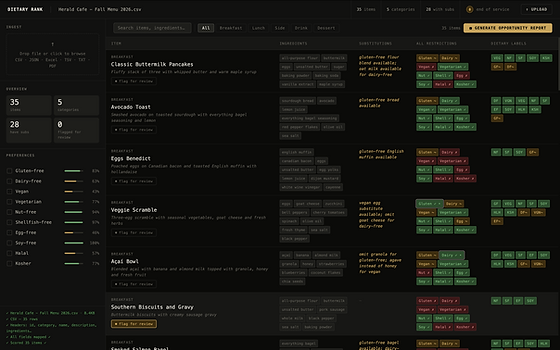
Upload a menu and Dietary Rank maps every item against the preferences guests choose by, showing menu-wide fit, item-level labels, available substitutions, and items your team has flagged for review. Then turn it into an Opportunity Report.
1. Upload a Menu
Start with the menu file your restaurant already uses: CSV, Excel, JSON, TSV, TXT or PDF.
2. Map Guest Fit
Every item is scored against common guest preferences, with menu-wide fit percentages and the substitutions your kitchen already offers.
3. Review & Act
Flag items for staff review, then generate an Opportunity Report and a preference-specific menu.

Make Guest Alignment Part of Discovery.
Guests decide whether a restaurant is worth a closer look before they ever open the menu. Dietary Rank helps you reach the guests your menu already serves best, right at that moment.
Prequalify Your Guests
Keep Guest Fit Current
See Who You're Reaching
See which guests your current menu already serves best, from vegetarian and halal to gluten-free and nut-free, and put that fit in front of them while they're choosing where to eat.
Upload your menu once and we send quarterly updates. Need a change sooner? Make a correction yourself and it updates in the system instantly.
Track how guest fit shows up in engagement, reservations and orders, where tracking and data are available.

Let's Look at Your Menu.
Bring an existing menu and see which guests it already serves best and what the Opportunity Report reveals. Nothing about your menu or kitchen has to change, and no integration is needed to start.
1. Share a Menu File
Send us a menu file before the call, or bring one to the demo.
2. Review It Together
Walk through your guest-fit analysis, preference-specific menus and the Opportunity Report, live.
3. Find Your Fit
We map out how Dietary Rank fits your restaurant and set up the approach that works for you.
